
 Español (ES)
  Português (PT)
  Italiano (IT)
  Deutsch (DE)
  Français (FR)
  English (EN)
 Make sports exercises with graphics schemes, a simple program to create sports exercises, drawing drills and trainings, tutorials, techniques and tactics
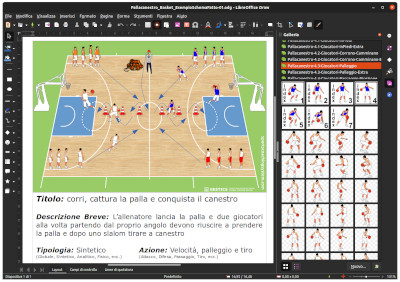 GESTICS is a system for the construction of sports exercises, drills, sports drills and trainings, tutorials, techniques and tactics mainly for team sports, but also for individual sports and MOVEMENT AND SPORTS GAMES FOR KIDS.
GESTICS stands for Graphics Sports Training Exercises - Images Coaching System.
GESTICS was designed and created by the experiences of the coaches for coaches.
GESTICS allows you to create graphic images in color or black and white drawings and complete training sessions, using playing fields, with views of both two-dimensional (2D) and three-dimensional (3D) models of the players divided and organized into libraries that analyze and represent the various situations and the fundamentals of the game. In volleyball, for example, we find in addition to dozens of fields many models of players standing at the service, receiving, dribbling, attacking, at wall or in defense.
G ESTICS for every sport and every game situations provides models of players with a view from the front, back, side, front and oblique oblique behind that will allow us to represent exercises, exercises and games in different angles. For each sport will also find a whole range of generic accessories (hurdles, hoops, sticks, bollards, cones, etc..) And specific (balls, goal, doors, baskets, barriers, flags, stairs, etc..) As well as other useful accessories in training and exercises (benches, carpets, etc..).
GESTICS provides the players in the various libraries, fields, and accessories that are all in vector format, this means that even if you magnify the image, to project it on a big screen, the resolution is always maximum, preventing see that ugly pixelated which makes the grainy images and check all small squares.
GESTICS allows you to move, color, rotate and resize at will any item or accessory, T-shirts and shorts of the players, as well as create custom libraries to be reused in other projects.
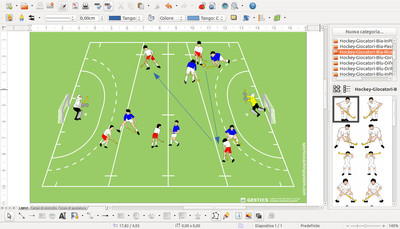 GESTICS allows you to print your own cards workout on paper in any format, export your work in PDF or image format (jpg, png, gif, etc..), Save and reuse at a later time.
GESTICS born with an idea of simplicity that allows us to focus on the job rather than having to waste whole days to learn a new computer program.
GESTICS can be used by anyone who can use an Office software (LibreOffice / OpenOffice), even with only a basic knowledge. With gestic anyone can now create their own cards of sports exercise, trainings and tutorials.
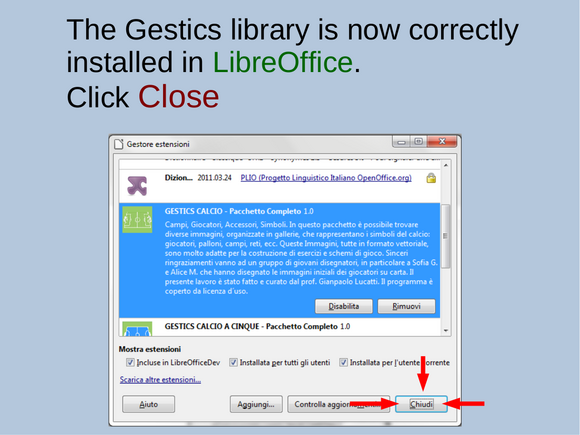
GESTICS it is installed as an extension in LibreOffice / OpenOffice and allows you to use all the functions that this wonderful program provides. If we have not yet installed this software, no problem, it is an open source software, licensed under the GNU LGPL, Multilingual (more than 50 languages around the world) that you can download, install and use for free at your own leisure. Libreoffice / Openoffice are complete suite of programs for writing, drawing, presentations, etc.. 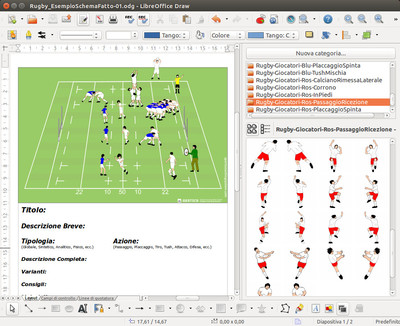 Although with very few differences, we recommend the use of Libreoffice. The latest version can be downloaded from the official international website:
https://www.libreoffice.org/download/libreoffice-fresh/
GESTICS is multilingual and integrates seamlessly within LibreOffice / OpenOffice. In addition GESTICS is modular, meaning that you can buy separate packages that will fit once installed; For example you can buy the soccer package that includes everything needed to create their own jobs. But if later the user wants to create futsal sports exercise or require additional models of players, no problem, there are additional modules at a reduced cost that install only futsal fields, or hundreds of models of players and goalkeepers.
GESTICS can be used by the word processor (Writer) and through the presentation program (Impress), but the program better and more suitable for the purpose is surely the design (Draw)




Easy and user-frendly software to make sports exercises with graphics schemes, a simple program to create sports exercises, drawing drills and training, tutorials, techniques and tactics in tennis
 It is an extension, that is an addition to the program LibreOffice / OpenOffice that allows anyone to create sports exercises, drills, diagrams and game situations even if you don't have drawing skills.
In fact, with a few simple mouse movements you can set various types and various views of the tennis court, have the players and objects, set trajectories of the ball, etc.
In this package you can find several images representing the symbols of the sport court: players, ball, fields, networks, etc. These images, all in vector format, are very suitable for the construction of exercises and drills.
Sincere thanks go to a group of young designers, particularly Benedetta S. Sara S. Lorenzo D. Niccolò T. who designed the initial images of the players on paper. The present work has been done and edited by prof. Gianpaolo Lucatti. The images have been revised and organized in the gallery in different themes. The program is covered by a license that will be asked of course the end user to be accepted in the time of installation.
 As soon as we finished the installation we are ready to begin.
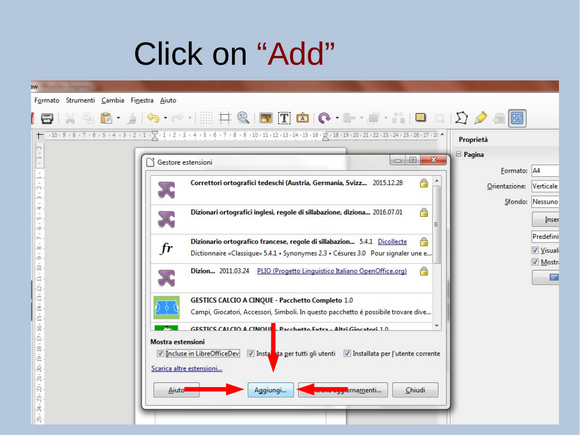
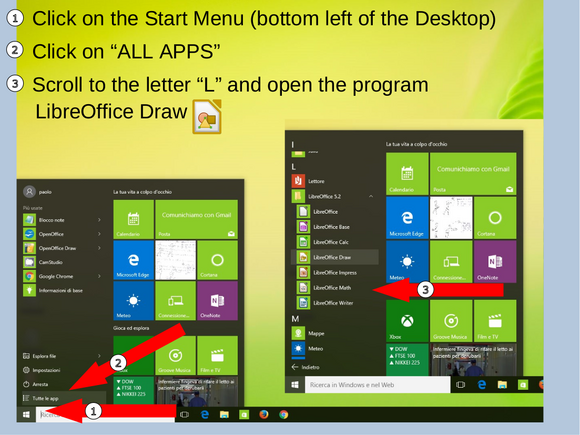
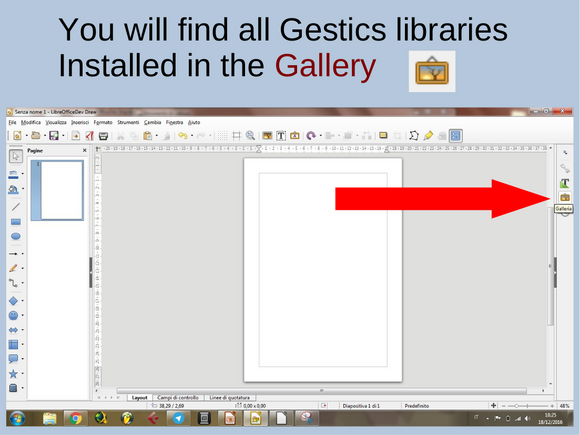
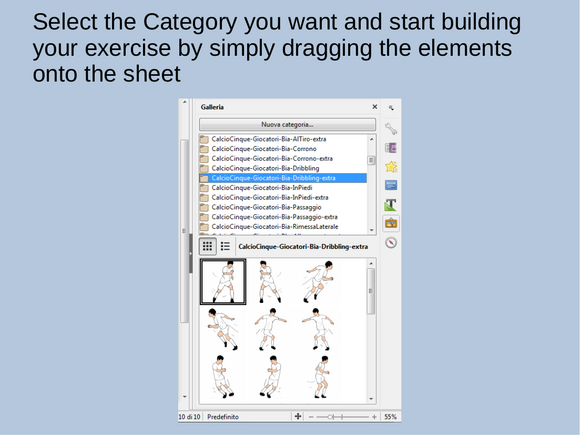
To use GESTICS just open LibreOffice Draw (Drawing), the software to create drawings, click on the gallery  (Or go to the Tools menu and click Gallery.) And GESTICS can be used by other programs in LibreOffice, in fact, the gallery will be also integrated in Libreoffice Writer (word processor), in Libreoffice Impress (presentations) and in all other programs in the suite.
The galleries are organized in a simple and intuitive way!
The basic model that LibreOffice Draw displays at the time of the opening has the page set with margins at 1 cm on all sides. We recommend you to set the page with margins 2 cm on all sides, (To do this just go to the menu Format -> Page and from there set the margins to 2 cm), or download or open directly from this link the template already set up as it should, named (Base Model Creation Of Cards For Exercises Schemes tennis.odg), inclusive of the fields related to the description of the exercise and simply open it.
 Create your own sports exercises and trainings, diagrams of play with a few clicks!
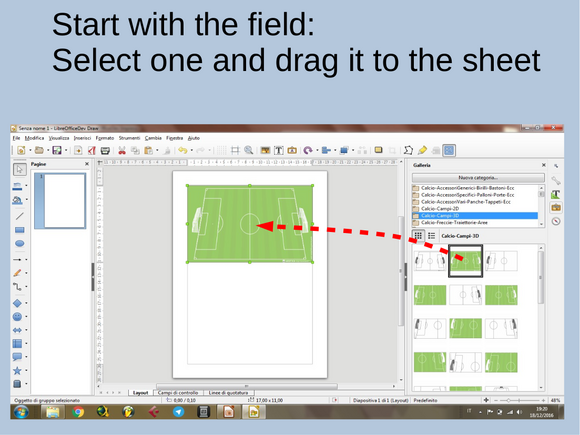
We begin to enter a playing field. We go for example in tennis 3D fields gallery, click and drag the field you want. You can choose the entire field or half-court with the view from above, of a sport to your liking. Position it in the top of the sheet, at the intersection of margins.
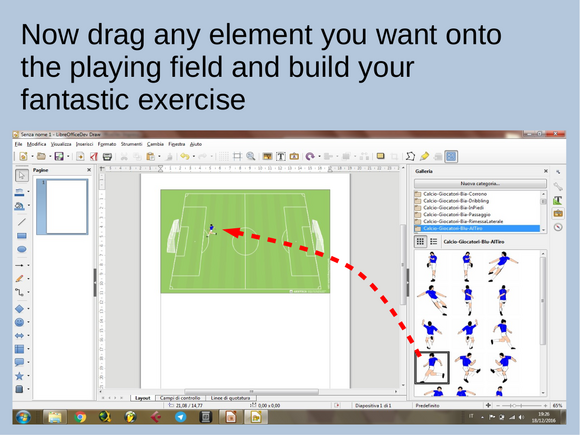
Then we go to the gallery of the players we are interested in, such as standing or in defense, choosing the color you want (of course we can always color them after their own pleasure). Now you can take the ball or the basket of balls, braces, pins, add text or another.
At the end of your work you can made the description, and also in this case ypu have at the bottom of all the models of fields, a text frame preset that once dragged and positioned in the page is ready to be able to enter a description or if you do not like you can edit or create a new one according to your needs.
At the end of your work save the file, print it, turn it into a picture or export to pdf. Your exercises or diagram of play will be so ready, also perfect in detail and easy to categorize and remember.
Good preparation of trainings and enjoy with GESTICS !!!
|
|
|
||||||
|
|||||||
Easy and user-frendly software to make sports exercises with graphics schemes, a simple program to create sports exercises, drawing drills and training, tutorials, techniques and tactics in rugby
 It is an extension, that is an addition to the program LibreOffice / OpenOffice that allows anyone to create sports exercises, drills, diagrams and game situations even if you don't have drawing skills.
In fact, with a few simple mouse movements you can set up various types and various views of the rugby field, place players and objects, set the trajectory of the ball, and so on.
In this package you can find several images that represent the symbols of the sport rugby players, footballs, golf, doors, etc.. These images, all in vector format, are very suitable for the construction of exercises and drills.
Sincere thanks go to a group of young designers, in particular, to Violante A. Luis C. Tommaso R. e Matteo Z. who designed the initial images of the players on paper. The present work has been done and edited by prof. Gianpaolo Lucatti. The images have been revised and organized in the gallery in different themes. The program is covered by a license that will be asked of course the end user to be accepted at the time of installation.
As soon as we finished the installation we are ready to begin.
To use GESTICS just open LibreOffice Draw (Drawing), the software to create drawings, click on the gallery (Or go to the Tools menu and click Gallery.) And GESTICS can be used by other programs in LibreOffice, in fact, the gallery will be also integrated in Libreoffice Writer (word processor), in Libreoffice Impress (presentations) and in all other programs in the suite.
The galleries are organized in a simple and intuitive way!
The basic model that LibreOffice Draw displays at the time of the opening has the page set with margins at 1 cm on all sides. We recommend that you set the page margins to 2 cm on all sides, (To do this just go to the menu Format -> Page and from there set the margins to 2 cm), or open or download directly from this link the template already set up as it should be called (Base Model Creation Of Cards For Exercises Diagrams rugby.odg), inclusive of the fields related to the description of the exercise and simply open it.
 Create your own sports exercises and trainings, diagrams of play with a few clicks!
We begin to enter a playing field. We go for example in rugby 3D fields gallery, click and drag the field you want. You can choose the entire field or half-court with the view from above, of a sport to your liking. Position it in the top of the sheet, at the intersection of margins.
Then we go to the gallery of the players we are interested in, such as standing or in defense, choosing the color you want (of course we can always color them after their own pleasure). Now you can take the ball or the basket of balls, braces, pins, add text or another.
At the end of your work you can made the description, and also in this case ypu have at the bottom of all the models of fields, a text frame preset that once dragged and positioned in the page is ready to be able to enter a description or if you do not like you can edit or create a new one according to your needs.
At the end of your work save the file, print it, turn it into a picture or export to pdf. Your exercises or diagram of play will be so ready, also perfect in detail and easy to categorize and remember.
Good preparation of training and fun with GESTICS !!!
|
|||||||
|
|||||||

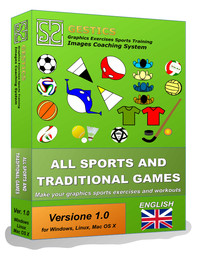
Easy and user-frendly software to make sports exercises with graphics schemes, a simple program to create sports exercises, drawing drills and training, tutorials, techniques and tactics in ALL SPORTS AND GAMES, WITH SYMBOLS
 It is an extension, that is an addition to the program LibreOffice / OpenOffice that allows anyone to create sports exercises, drills, patterns and situations of the game even if you have no drawing skills.
This program is particularly suitable for students and teachers, athletes, speakers, coaches, and fans in general, who want to quickly and easily embrace ALL SPORTS AND GAMES, WITH SYMBOLS. In fact, with a few simple mouse movements you can set up various types and various views of the golf game, all major sports (Soccer, Futsal, Indoor Soccer, Field Hockey, Ice Hockey and Hockey on the runway, Basketball, Handball, Volleyball WaterPolo, Rugby, Tennis, Badminton, Squash, Table Tennis, and all the MOVEMENT AND SPORTS GAMES FOR KIDS (eg. flag, dodgeball, hawk, ...)., have players and objects, set the trajectory of the ball, and so on.
In this package you can find several images that represent the stylized symbols suitable for all sports: players with top view, players with a symbol in a circle or triangle, players with the symbol on the T-Shirt, players with the symbol on the numbers or letters, balls, goal, golf accessories, training, etc.. These images, all in vector format, are very suitable for the construction of sports exercises, drills and drills.
The fundamental difference between this and the other packages in the collection GESTICS is that in the specific sports packages there are the models of the sport with all the players involved in the various game situations and training (Players standing, dribbling, passing, ... Players with a view of the front, back, side, front and oblique oblique behind, in short, all the components that together give a three-dimensional view of the situation represented) and the playing fields with views of both 2D and 3D view, while in this package Players are stylized with a view from the top or with symbols that represent all the players, eg. T-shirts, numbers, or letters and 2D playing fields of all major sports, but with only the view from above and not in perspective so as to give depth and three-dimensionality to the graphical representation.
The present work has been done and edited by prof. Gianpaolo Lucatti. The images have been revised and organized in the gallery in different themes. The program is covered by a license that will be asked of course the end user to be accepted at the time of installation.
 As soon as we finished the installation we are ready to begin.
To use GESTICS just open LibreOffice Draw (Drawing), ie the software to create drawings, click on the gallery (Or go to the Tools menu and click Gallery.) And GESTICS can be used by other programs in LibreOffice, in fact, the gallery will be also integrated in Libreoffice Writer (word processor), in Libreoffice Impress (presentations) and in all other programs in the suite.
The galleries are organized in a very simple and intuitive!
The basic model that LibreOffice Draw displays at the time of the opening has the page set with margins at 1 cm on all sides. We recommend that you set the page margins to 2 cm on all sides, (To do this just go to the menu Format -> Page and from there set the margins to 2 cm), or open or download directly from this link the template already set up as it should be called (Base Model Creation Of Cards For Exercises Diagrams allsports.odg) , inclusive of the fields related to the description of the exercise and simply open it.
 We create our own exercises and training schemes and play with a few clicks!
We begin to enter a playing field. Let's go to the gallery TuttiSports example, the fields of 3D and begin to drag the playing field we want. We can choose the field of whole or half of the field with a view from above, of a sport at your own leisure. Position it at the top of the sheet, at the margins.
Then we go to the gallery of the symbols of the players we are interested, for example symbol player seen from above, circles, triangles, t-shirts, choosing the color you want (of course you can always color them after at your own pleasure). Now we can take the ball or the basket of balls, braces, pins, add text or another.
At the end of our work we have made the description, and also in this case we have at the bottom of all the models of the fields, a text frame preset that once dragged and positioned in the page is ready to be able to enter a description or if we do not like we can edit or create a new one according to your needs.
At the end of their work save the file, print it, turn it into a picture or export to pdf. Our exercises or sports drills will be so ready, also perfect in detail and easy to categorize and remember.
Good preparation of training and fun with GESTICS !!!
|
|||||||
|
|||||||
Subcategories
EN - Sport Exercises
EN - Football - Sport Exercises
Football - Sport Exercises
EN - Futsal - Sport Exercises
Futsal - Sport Exercises
EN - Basketball - Sport Exercises
Basketball - Sport Exercises
EN - Volleyball - Sport Exercises
Volleyball - Sport Exercises
EN - Rugby - Sport Exercises
Rugby - Sport Exercises
EN - Tennis - Sport Exercises
Tennis - Sport Exercises
EN - Movement and Sports Games for Kids - Sport Exercises
Movement and Sports Games for Kids - Sport Exercises